Homelab writeup · Aug 2026
Two boxes in a cupboard
Everything here runs on two machines: a little NAS that holds the disks, and a mini PC that does the actual work. Between them they run 43 containers — media, home automation, game servers, DNS, and a monitoring stack that mostly exists to tell me when I've broken something.
None of this is clever, exactly. It's just a lot of small decisions that each made sense at the time, plus a handful of rules I only follow because ignoring them cost me a weekend. Here's what's running and why.
The two boxes
The split is deliberate: the NAS stores things, the mini PC does things. The NAS is a low-power 4-core unit with the drive bays — great at sitting there serving files, miserable at transcoding video. So it runs the handful of services that need to be up whenever the network is up, and nothing else. Everything hungry lives on the other box and mounts the array over the network.
the NAS
- ChassisUGREEN DXP2800
- OSDebian 12
- CPU4 cores
- RAM16.5 GB
- Bulk7.9 TB spinning
- Fast1 TB SSD
- Containers13
the mini PC
- CPURyzen 5 7640HS
- Threads12
- OSUbuntu 24.04
- RAM13 GB
- Disk1 TB NVMe
- iGPURadeon 760M
- Containers30
The one rule I'm strict about: app databases never touch the network share. They sit on the mini PC's local NVMe and get copied to the array nightly. Media goes the other way — written once, read forever, perfectly happy on spinning disks.
Downloads and the library also share one filesystem, deliberately — that way importing a finished download is a hardlink, not a copy. No second copy, no waiting for 40 GB to move across the network, and seeding continues from the same bytes the media server is reading.
SQLite over NFS corrupts. Not "might corrupt under load" — it will, and you won't find out until something refuses to open a database it was happily writing to yesterday. Every app that keeps state got moved to local disk after that.
Getting in
There's exactly one way in from the internet: a reverse proxy on the NAS that handles TLS and certificate renewal. Everything public goes through it. What's behind it got split by who it's for.
Stuff other people use is public — the media server, the request portal, audiobooks, home automation. Friends and family shouldn't need a VPN client to watch a film.
Everything I use to run the place isn't. Container management, dashboards, DNS admin, the NAS's own UI, all the download tooling — I pulled every one of those off the public internet and put them behind a mesh VPN. They're only reachable from devices I've explicitly enrolled. It's a meaningfully smaller attack surface for about ten minutes of work, and the only cost is that my phone needs the VPN toggled on to fix things from the pub.
Single sign-on
An identity provider sits in front and now speaks OpenID Connect properly, so apps that support it authenticate against one account with 2FA instead of each having its own password. Before that it worked by trusting a header from a whitelisted address — fine behind a single proxy hop, genuinely dangerous once a whole mesh network is upstream, because any device on it could just assert whoever it liked.
What's actually running
Rather than list it twice, here's the dashboard I actually open — every card is a live widget pulling from the service behind it, so queue lengths, disk usage and what's currently downloading are real numbers rather than a static page.
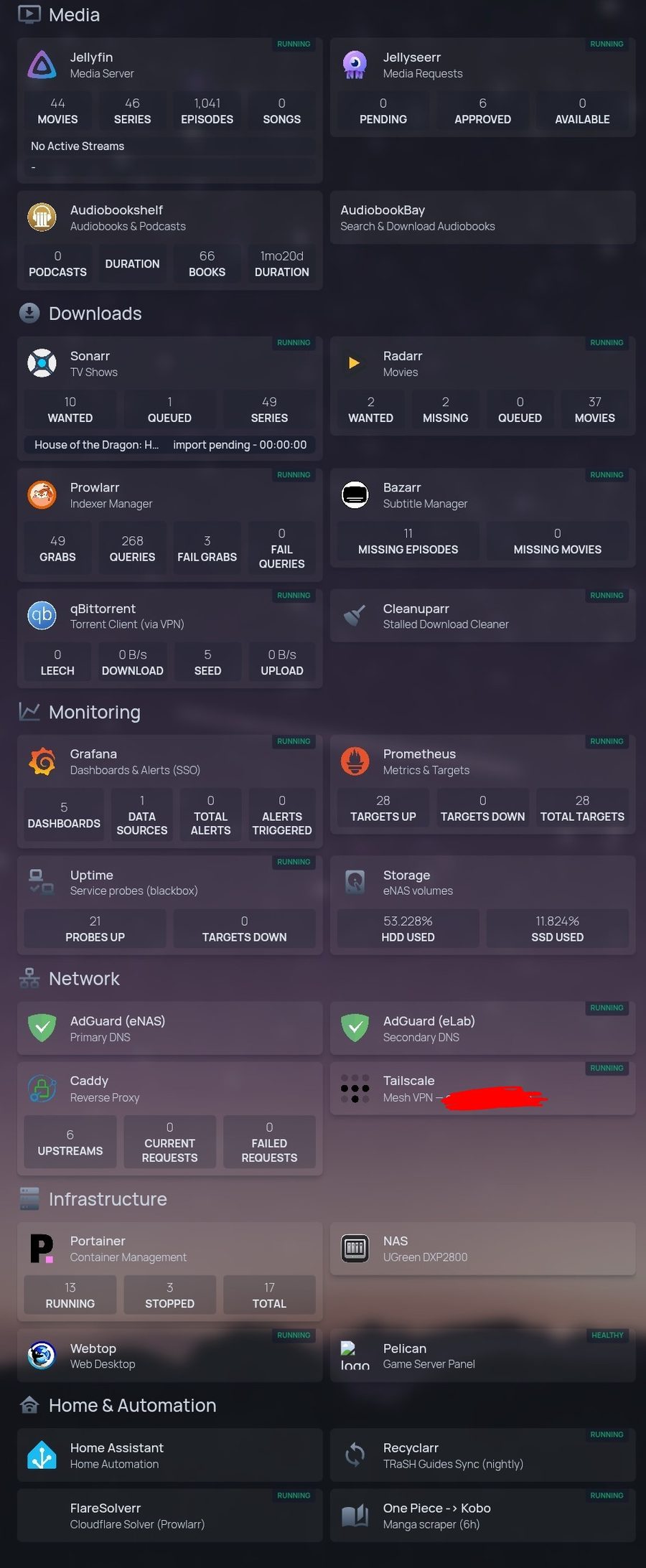
Media
- jellyfin
- The media server. Transcodes on the iGPU, which is the entire reason it lives on the mini PC and not the NAS.
- jellyseerr
- Where people request things. This is the bit that made the setup actually useful to anyone but me — no more "can you add X" messages.
- audiobookshelf
- Audiobooks and podcasts, with a mobile app that syncs position properly.
Getting media in
- sonarr · radarr
- Track series and films, grab them, rename them, keep upgrading quality until they hit the target and then stop.
- prowlarr
- One place to configure indexers instead of pasting the same config into every app. Also tracks which ones are failing.
- bazarr
- Subtitles. Unglamorous, runs forever, nobody thinks about it.
- qbittorrent
- Download client. Runs inside a VPN network namespace with a kill switch — if the tunnel drops it loses all connectivity rather than falling back to the home connection.
- cleanuparr
- Kills stalled and junk downloads so the queue doesn't slowly fill with things that will never finish.
- recyclarr
- Syncs community-maintained quality profiles nightly, so release selection improves without me tuning scoring rules by hand.
- flaresolverr
- Gets past bot checks on the indexers that use them. Works about 70% of the time, which is better than nothing.
- port-updater
- Tiny sidecar. The VPN hands out a forwarded port that changes without warning; this watches for it and pushes the new one into the download client's config over its API. Twelve lines of shell that quietly removed a recurring annoyance.
Knowing when it's broken
- prometheus
- Scrapes 27 targets, keeps 30 days, ~16k active series. Small by work standards, plenty here.
- grafana
- Dashboards and alerts. Logs in via SSO now rather than its own password.
- blackbox exporter
- Probes every service from outside itself. The important one — a container can be "running" and still be serving errors, and only an actual HTTP request catches that.
- node exporter · cadvisor
- Host and per-container metrics on both machines. This is where "why is the disk full" gets answered.
Network
- caddy
- Reverse proxy. Does TLS certificates automatically, which is the whole reason I picked it.
- authelia
- Login portal, 2FA, and now an OIDC provider for the apps that speak it.
- adguard home ×2
- DNS filtering, one per box. Two because DNS going down takes the whole house with it, and that's a bad way to find out your NAS rebooted.
- tailscale
- The mesh VPN everything admin-y hides behind.
- dynamic DNS
- Residential connection, so something has to keep the DNS record pointed at the right place.
Running the place
- portainer
- Manages containers on both hosts from one UI. Also has an API, which is how a lot of the automation actually reaches the NAS.
- homepage
- Dashboard with live widgets — queue lengths, disk usage, what's downloading. The page I actually open.
- pelican + wings
- Game server panel and its runtime. Currently hosting a Valheim world.
- webtop
- A Linux desktop in a browser tab, for when I need a GUI on the network without getting a laptop out.
- deunhealth
- Watches for containers failing their own health check and restarts them. Tiny, dumb, has saved me several times.
Home and one-offs
- home assistant
- All the smart home stuff.
- manga pipeline
- Something I wrote: watches for new One Piece chapters, converts them to a proper e-reader format with colour pages preserved, and drops them in cloud storage my Kobo syncs from. Chapter appears, and twenty minutes later it's on the reader without me doing anything.
The stuff that runs itself
I maintain this in evenings, so anything I'd have to do twice gets automated, and anything that breaks in a predictable way gets taught to fix itself.
A health check runs every five minutes and does six things: are all the scrape targets up, are the containers running, are the network mounts alive, is there disk headroom, is the VPN actually passing traffic, and do the external probes pass. It writes its own results out as metrics, so the monitoring stack monitors the monitor.
When it finds a known failure it just fixes it. The common one: if the VPN gateway gets rebuilt, every container sharing its network stack is left stranded and has to be rebuilt too. That used to be me, at a terminal. Now it's a script, and each fix is rate-limited so a flapping service can't send it into a restart loop.
If something is still broken after two consecutive cycles, it hands off to an AI agent with a deliberately narrow, mostly read-only toolset, which investigates and writes what it found to the log. Not because it reliably fixes things — because coming back to a diagnosis beats coming back to "it's down".
That escalation writes to a log file and nothing else. There's no push notification, so if I'm not looking, I genuinely don't know. It's the most obvious hole in the whole setup and it's been on the list for months.
The rest is unglamorous: config backed up to the array nightly, quality profiles synced nightly, certificates renewed automatically — and separately probed for expiry, because trusting a renewer to tell you it failed is exactly how certificates lapse.
How I actually drive it
There's a tmux session on the mini PC that has been open since early July,
and that's the control plane. Inside it: Claude Code and
OpenCode, both pointed at the same set of notes I've written about
this estate — the topology, the deploy commands for each stack, and every gotcha
further down this page.
The useful part isn't the chat, it's the tool access. Both are wired to MCP servers for the container manager and for the metrics stack, so an agent can list what's running on either host, read a stack's compose file, redeploy it, and query PromQL directly instead of me pasting numbers at it. Asking "why is nothing downloading" and having it actually walk the chain — VPN egress, then indexer health, then per-release rejections — beats doing that by hand at 11pm.
Both tools read the same skill files, so the context lives in one place rather than being re-explained per tool. That's also what makes the health check's escalation worth anything: when it hands off a persistent fault, the agent already knows what this setup looks like and which failure modes are normal here.
There's no SSH into the NAS — it's an appliance. Everything I do on that box goes through the container manager's Docker API instead: exec into a running container to read a config, or spin up a throwaway one to poke at the host. Awkward at first, and now genuinely fine. It also forced every change on that machine to be scripted rather than typed, which turned out to be an accident worth keeping.
Runbooks
Three failure modes have happened often enough to be written up properly: the VPN tunnel dying in a way that doesn't self-heal, the network mounts losing a race with Docker at boot, and recovering from a power cut. They're checklists, not prose — the point is that 11pm-me doesn't have to re-derive anything that midnight-me already worked out once.
Things that bit me
Every one of these is a rule now because it wasn't before.
Mount directories, not single files. Loads of programs save by writing a temp file and renaming it over the original. You can't rename across a single-file bind mount, so the save fails — and plenty of them carry on quite happily with the old contents. I had a tool silently failing to persist a refreshed auth token for two months this way. Everything worked right up until the moment the in-memory token would have expired.
Recreate, don't restart. Containers that share another container's network stack bind to that container's identity when they're created. Rebuild the one they're attached to and restarting them doesn't help — it fails outright, complaining about a container ID that no longer exists. They have to be recreated.
Bind to all interfaces, not one address. I had several services pinned to the LAN address. They worked perfectly from the LAN and were completely invisible over the VPN — connection refused, which looks exactly like a dead service. Took an embarrassingly long time to spot, because every test I ran was from a machine where it worked.
Port-remapping breaks host header checks. A download client kept
returning 401 Unauthorized over the VPN. It wasn't auth at all — the app
validates that the port in the Host header matches its own listening port,
and Docker was publishing it on a different one, so that check could never pass.
The error it reports for this is indistinguishable from a wrong password.
Watch what a repeated flag swallows. The escalation script passed a list of permitted tools and then the prompt as the final argument. That flag takes any number of values — so it ate the prompt as one more tool name, and the agent was invoked with nothing to do. It failed silently for seven days before I noticed. The prompt goes in on stdin now.
Check what the defaults actually do. The manga pipeline spent months producing greyscale files because the converter greyscales everything unless you pass one flag. The source had colour, the e-reader has a colour screen, and the pipeline was quietly throwing it away in the middle.
Where it's at
Roughly 3.9 TB of 7.3 TB usable, which gives me a while yet before the awkward conversation about more drives.
The honest gaps: there is no offsite backup. Config is copied between the two machines nightly, which covers a dead disk and does nothing at all about fire, theft or me running the wrong command with conviction. The media I could re-acquire; the configuration I'd rather not rebuild. That and the missing push notifications are the two things I'd fix first, and have said so for a while now.